
Natural Sandbox
Building a sandbox for agentic payments
Agents moving money leave no room for uncertainty. Before going live, developers need to validate every part of their integration, whether that means tracing a transaction through its lifecycle or understanding how their agents experience Natural.
We built Sandbox for that purpose: a dedicated testing environment that allows you to test your agents with production behavioral parity.
Goals for Sandbox
As a team steeped in payments and AI, we’ve worked with our fair share of sandboxes, many of which cover only a narrow happy path or behave inconsistently with production. Other products offered no sandbox at all.
We designed Natural’s Sandbox around the experience we wanted when building integrations ourselves. That standard shaped the technical decisions that followed.
- Sandbox needed to feel familiar from the first interaction. Developers and agents need to be able to use their existing Natural identity (known as a party), switch environments, and begin testing immediately.
- Payments are infamously dual-sided, where there’s a payer and a payee. Once inside Sandbox, a developer needs to be able to test a complete flow for their agent, including interactions that would normally come from another party.
- Test data and activity needs to remain contained within Sandbox and private to each party.
Together, these goals shaped the design of party fixtures, simulations, the identity model, and Sandbox’s underlying infrastructure.
Testing a payment request
Payment requests are a great example of a core money movement flow that is testable in Sandbox. The flow begins when an agent creates a payment request against the payment request fixture: a synthetic Sandbox party created under the agent’s party. The developer then triggers a simulation that fulfills the request as that payer. The request advances through its lifecycle, the integration receives the resulting webhooks, and the agent reconciles the outcome in their own system.
Supporting this flow requires two Sandbox capabilities: creating the payer and its wallet when the fixture is first used, and executing fulfillment as that payer through a simulation.
Creating test counterparties
The payment request fulfiller used above is one of several fixture roles available for payment flows.
Two of these roles model on-platform parties: the payment recipient and the payment request fulfiller. Agents can address either fixture by email, phone, or handle where applicable. On first use, Sandbox creates the underlying party and its wallet before continuing the original API request. The payment recipient can then receive payments, while the payment request fulfiller can be selected when creating a request. Payments involving either fixture follow the standard on-platform lifecycle, including webhook delivery.
Figure 1 shows this first-use path and the database relationships behind it. A sandbox_party_fixtures record links the developer’s party to the fixture party and records the simulation user that performs party actions as that fixture.
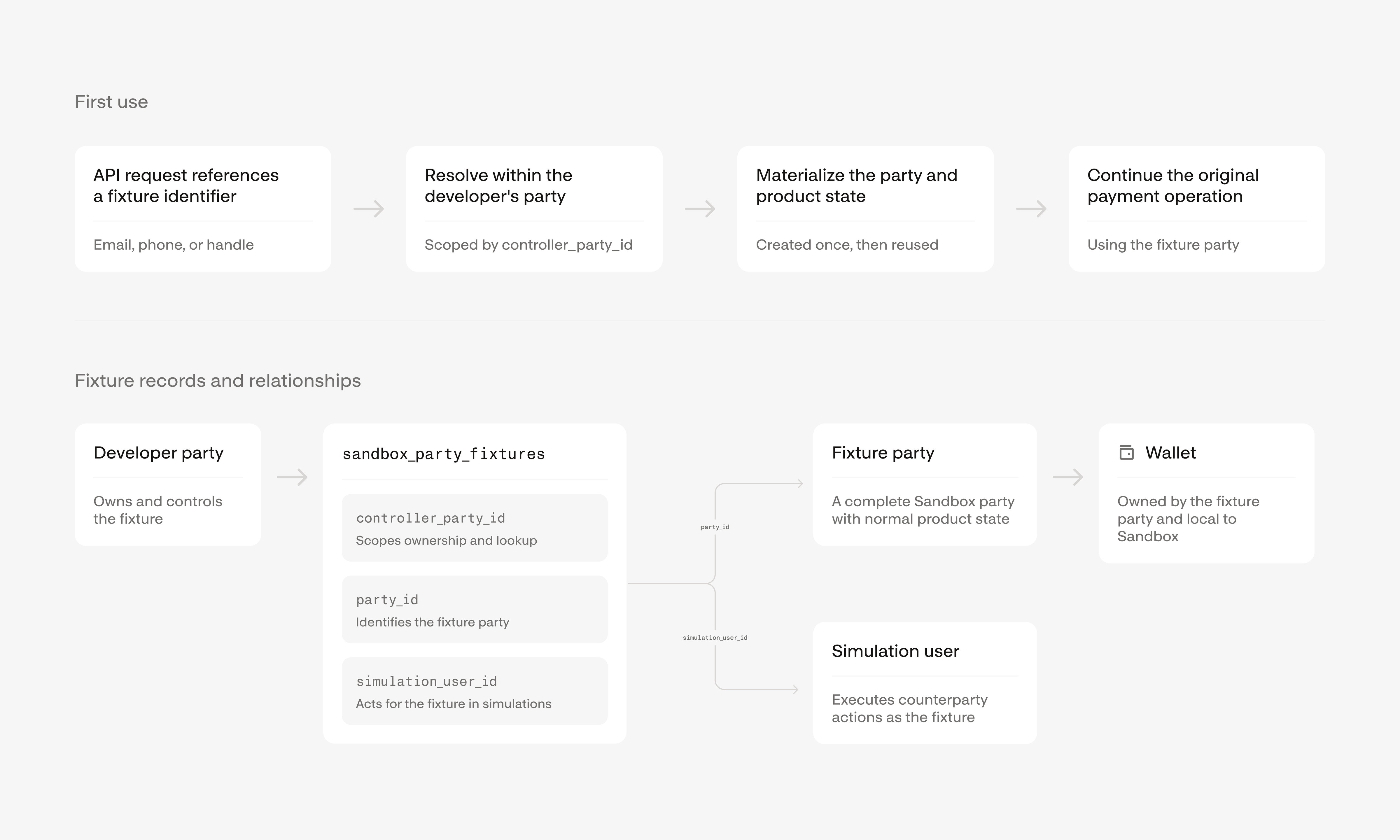
Figure 1. First-use creation and database relationships for an on-platform Sandbox fixture.
Payment claims provide an example of an off-platform flow. The payment claim recipient represents an agent, business, or individual who has yet to join Natural and must claim an incoming payment. Sending a payment to this fixture creates a fresh Sandbox party with the funds held and the claim pending, matching the state created for a new recipient in production.
Returning to the payment request example, Sandbox has now created the underlying payer party. The next step involves a simulation that fulfills the request as that payer.
Simulating actions
When the developer triggers the fulfillment simulation, Sandbox reads the payer’s control row and confirms that the agent’s party controls it. It then uses the fixture user recorded in that row to invoke the existing payment request fulfillment operation as the payer.
At that handoff, the simulation-specific code ends and the same fulfillment operation used in production takes over. It performs its normal validation, moves balances, advances the request through its state machine, and delivers the resulting webhooks.
Payment claims follow the same pattern. Sandbox invokes claim completion as the fixture recipient and lets the existing claim flow produce the resulting state changes and webhooks.
Across products, every simulation endpoint has the same narrow responsibility: resolve the controlled fixture and invoke the corresponding product operation as that party.
Technical underpinnings
Supporting the Sandbox experience requires us to preserve production behavior while keeping payment data, wallets, API keys, and provider credentials contained within Sandbox. We approached these requirements through two related design decisions: Sandbox would run as a complete deployment, and shared identity would cross the environment boundary through a narrow, controlled path. Production owns the identity records used by both environments, and Sandbox accesses them through scoped calls to production and versioned replication into its local database.
A complete, isolated deployment
Sandbox runs as a complete deployment of Natural in its own AWS account. A request entering Sandbox is handled entirely by resources in that account as it moves through the application, database, cache, queues, and workflows. Sandbox runs the same application code as production, with a single environment value selecting the appropriate downstream services and provider credentials at boot.
Defining the identity boundary
We wanted developers to use the same Natural user, party, and team in both environments. We achieved this by using production for authenticating and storing canonical identity records, while Sandbox stores local copies to authorize product requests. The replicated identity records includes users, parties, organization memberships, settings, domains, invitations, and beneficial owners. Each environment owns the product records created within it, including agents, wallets, customers, API keys, and payments.
Sandbox calls production over PrivateLink for identity operations that require an immediate response, including validating a session, inviting a teammate, and updating a team member’s role. An event stream from production keeps Sandbox’s local identity records current.
Identity operations over PrivateLink
When the Sandbox API receives a request containing a developer’s production session, it calls the production identity service to validate the session and identify the user. Production also handles login, password verification, one-time codes, and MFA.
Production owns the identity service, so Natural’s production AWS account acts as the PrivateLink service provider. An internal Network Load Balancer in the production VPC fronts the identity service and backs a VPC Endpoint Service. Natural’s Sandbox AWS account acts as the consumer. An interface endpoint in the Sandbox VPC connects to the service, and private DNS directs identity calls to that endpoint.
Figure 2 shows the two paths across this boundary. Sandbox sends synchronous identity operations to production over PrivateLink, while production replicates versioned identity records into Sandbox through SNS and SQS.
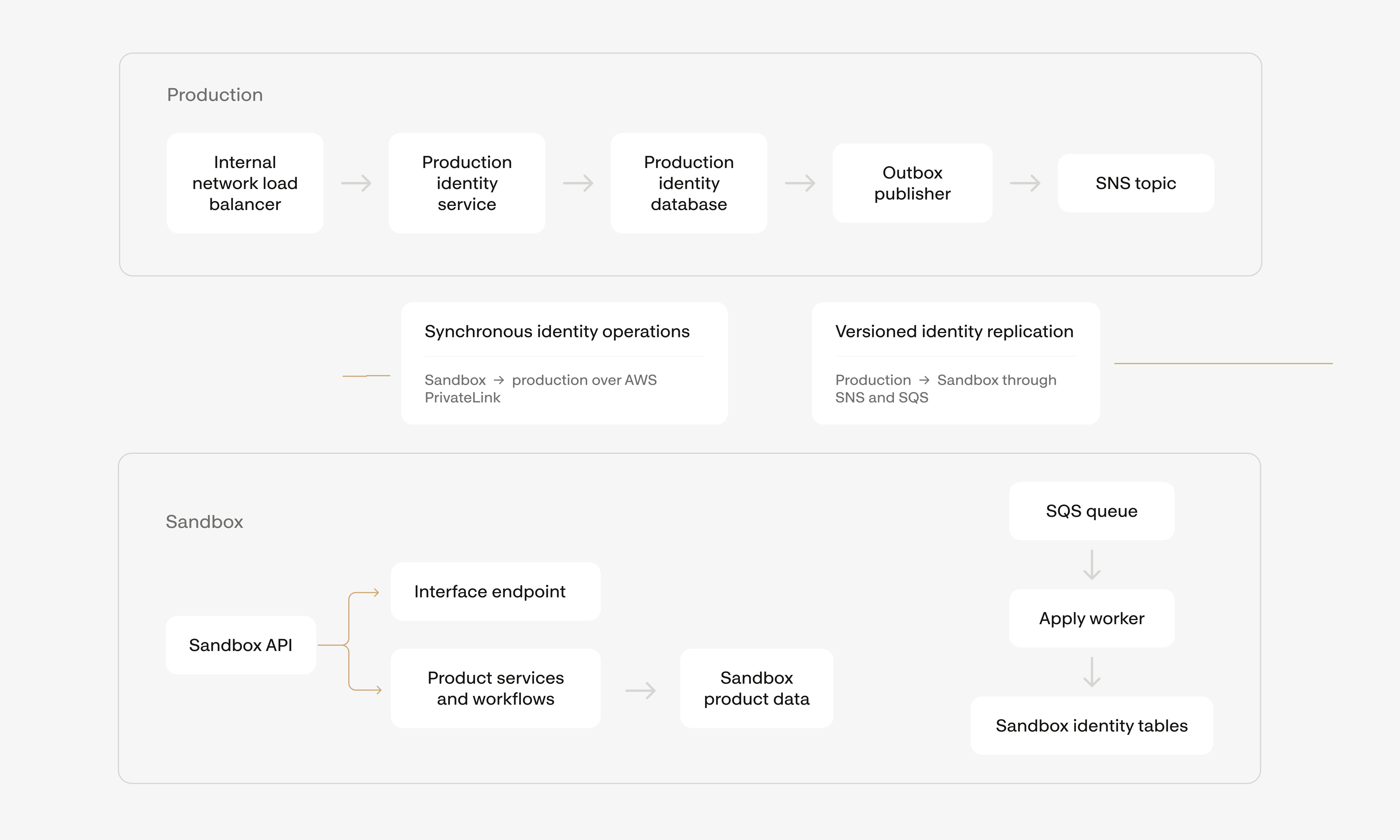
Figure 2. Identity operations and replication between Natural’s production and Sandbox AWS accounts.
For synchronous identity operations, the request path is: Sandbox API → Sandbox interface endpoint → AWS PrivateLink → production Network Load Balancer → production identity service
Sandbox initiates calls across this path, and the traffic stays on AWS’s private network.
The same PrivateLink path supports both validation requests and changes to production-owned identity records. A teammate invitation is one example. Sandbox checks the role on the developer’s production party membership and sends the invitation request to production. Production runs its existing invitation workflow, and the resulting identity change enters the replication pipeline.
Replicating identity into Sandbox
The event stream keeps Sandbox’s local identity records current. When an identity record changes in production, the update and an outbox row are committed in the same database transaction. This ties every committed change to its replication event. A publisher reads the outbox and sends each versioned snapshot to an SNS topic in the production AWS account.
An SQS queue in the Sandbox AWS account subscribes to that topic. The topic policy grants Sandbox permission to receive events, while production owns publishing. An “apply worker” reads each message and writes the snapshot into Sandbox’s identity tables.
The worker compares each snapshot’s production version with the version stored in Sandbox and applies the newer snapshot. It also records processed event IDs, making repeated deliveries safe. For example, if a party-membership snapshot arrives before its associated user record, the worker fetches the user from production over PrivateLink before applying the snapshot.
Routing requests between environments
When designing the Sandbox dashboard, we had a straightforward routing option: pair each backend with its own dashboard host, natural.com for production and sandbox.natural.com for Sandbox. We chose the superior product experience: a single dashboard at natural.com where developers use one Natural identity and switch environments from the profile menu.
This was substantially more technically complex than giving each environment its own dashboard host. The client must carry the selected environment as state for each user. The dashboard stores that selection in the browser, and the RPC client resolves an API host for every product request. Production calls go to the production API host, while Sandbox calls go to the Sandbox API host (api.sandbox. + natural.com). Authentication continues through production because production owns the user’s session.
When a product request reaches the Sandbox API, Sandbox validates the production session over PrivateLink. It then uses its local party record and the user’s party membership, including their role and status, to authorize the operation.
An environment switch updates request routing and displayed data together. The dashboard disables the toggle while a write request, such as creating a payment or updating settings, is in progress. After the request completes, the client changes the API host, clears data cached from the previous environment, and loads data from the selected environment. On a developer’s first visit to Sandbox, the dashboard waits for their party’s identity records to be copied before loading Sandbox data.
What’s next
If this sort of work excites you, join us at /careers.
