# Introducing Natural Voice
> Your voice agent can now take card payments without the caller ever leaving the call
- Author: Sarah Xu
- Published: November 23, 2026
- Category: Product
- Canonical: https://www.natural.com/blog/voice
Today, we’re officially launching Natural Voice. Your voice agent can now take payment information securely and seamlessly, without the customer ever leaving the call.
## Why voice agents stop at payment
Voice agents have become remarkably capable of handling complex customer conversations. From booking appointments and placing takeout orders to recovering missing payments, agents are offloading repetitive work for frontline teams.
For millions of small businesses, the phone is still the main channel through which they engage with their customers. But when it comes time for the customer to pay, the agent has to transfer them out-of-band, usually by redirecting them to a secure payment link or portal. Every handoff creates unnecessary friction and invites attrition, risking a lost conversion right when it matters most. Businesses we’ve spoken with see conversion jump from 40% to as high as 80% when payment-over-voice is added alongside payment links. Imagine a cashier who can ring you up but can’t take your card.
The reason for this is largely compliance. PCI DSS, the card industry’s security standards, make it difficult for voice agents to securely hear and process raw credit card numbers or banking credentials during a live call. These standards also apply to any system connected to the agent: the LLM, telephony provider, speech-to-text, transcripts, and logs.
Achieving and maintaining PCI compliance can be a tedious, protracted, and costly process. If they aren’t eager to take on months of work and diligence, teams building voice agents that need to move money typically utilize one of two workarounds:
- **Payment links:** The voice agent texts the caller a secure link to complete the payment, creating an opportunity for drop-off.
- **Human agent:** The call gets transferred to a person, bringing back the staffing requirement the agent was designed to relieve.
## Take a card payment during a phone call
With Voice, Natural’s agent handles the payment from start to finish. When it’s time for the customer to pay, your agent transfers the call to Natural’s agent, which takes the card information, charges it, confirms that the charge went through, and hands back the call.
Here’s what that looks like from start to finish:
> It’s Friday, and you’re getting together with friends for movie night. You call your local pizzeria to place an order, and an AI agent answers. You finish placing the order, then the agent automatically connects you to a secure payment line without interrupting the flow of the call.
[Listen to the call](https://www.natural.com/assets/audio/voice/voice-call-a52a62a5.mp3)
Behind the scenes, the pizzeria’s voice agent creates a payment intent for the order, which tells Natural how much to collect. It then opens a voice session for that payment and transfers the call to Natural. Natural’s agent joins the call, names the pizzeria, confirms the total, and asks whether the caller wants to proceed with the payment. It then collects the customer’s card information, which can be spoken out loud or typed in on the keypad (DTMF).
Once the caller confirms, Natural charges the card and tells them whether or not the payment went through. If it doesn’t, Natural’s agent asks them to re-read the card or try a different payment method. After three failed attempts, the caller is texted a checkout link as a fallback.
Natural’s agent then either ends the call or hands it back to the pizzeria’s voice agent, which picks up where it left off. The entire transaction is completed while the caller is on the line.
## Keeping your systems out of PCI scope
Since your agent isn’t on the call while payment information is being collected, card details never reach your agent, model, or logs. Natural handles all of the compliance and security requirements, so your team can accept payments securely without dealing with the compliance burden.
We deliberately designed Natural Voice with safeguards in place to ensure a secure, seamless handoff on every call:
- **Encrypted calls:** Natural rejects any call that isn’t encrypted, so no one can listen in while card information is being read.
- **Approved phone systems:** Natural only accepts calls from approved phone systems.
- **Single-use transfer addresses:** Each transfer address works only for that specific call and expires after 15 minutes.
- **Test calls before going live:** Natural reviews your setup and places test calls with you to make sure that nothing on your side recorded, transcribed, or logged the call.
## What your voice agent gets back
Every call ends in one of three outcomes: paid, link sent, or unpaid. When a call finishes, your system receives a webhook with the payment status, alongside a log of every call: timestamps and a full transcript with card details scrubbed.
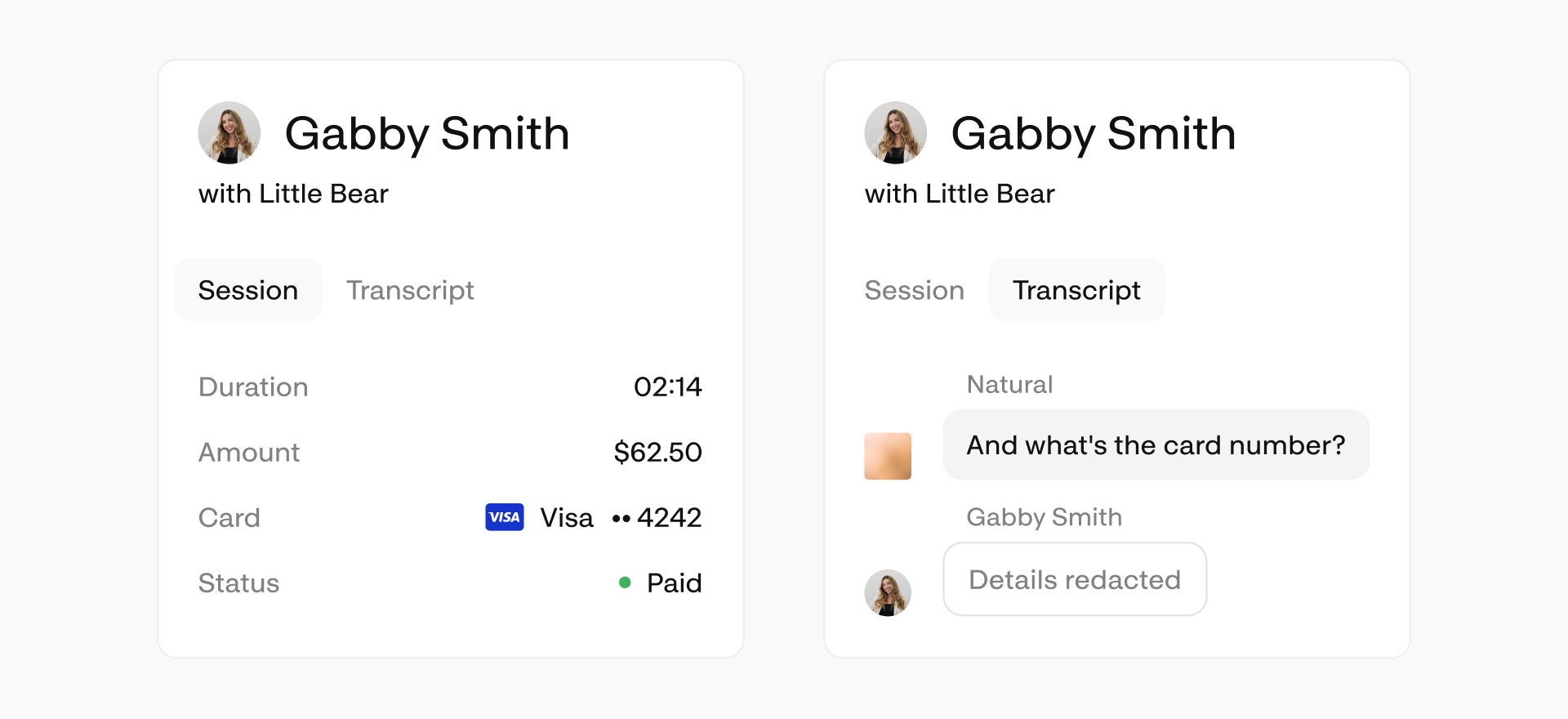
For agent builders, the order, card capture, and charge all happen in one system, so you get a complete, consolidated record of what happened on every call.
## Where the money goes
Natural Voice is a channel for [Accept](https://www.natural.com/accept), meaning the funds from each payment settle into the business’s Natural Wallet. Each payment shows up in the same dashboard and API, and refunds and disputes go through the same API as every other Natural payment.
Once it settles, your agents can use the money in your Natural Wallet on your behalf to carry out other business functions, from paying vendors and moving money between wallets to transacting online.
## How Natural’s payment agent handles edge cases
People rarely read out their card number in one clean pass. They might pause to grab their wallet, stumble on a digit, or pause halfway through. Natural’s payment agent is built to navigate the messiness of phone calls in the real world.
If a caller drifts off topic, Natural’s agent steers them back. If they interject, append irrelevant details, read details out of order, or correct themselves, it keeps up and brings the conversation back to the payment. The customer won’t get charged until the caller clearly authorizes the agent to do so.
Under the hood, model and code checks work in tandem to ensure that card details are captured and handled correctly: the right amount is charged, a card isn’t charged twice, and whether to re-read the card, try a different one, or text a payment link after a decline.
Natural also runs internal evals that simulate tricky call scenarios: different accents, fast talkers, interrupters, people who correct themselves, declined cards, and callers who refuse to pay.
## Natural Voice: Use cases
We’ve seen strong interest in voice payments from agent builders across industries:
Restaurants
Takeout orders and reservation deposits
Home services
Service fees, appointment deposits, and invoices
Hotels and events
Rooms and booking deposits
Healthcare and dental
Appointment fees and outstanding balances
Auto services
Repair deposits, service invoices, and towing fees
Salons and spas
Appointment deposits and no-show fees
Property management
Rent, late fees, deposits, and maintenance charges
Utilities and telecom
Bill payments and reconnection fees
Collections
Past-due balances and payment plans
## How to enable payments over the phone for your voice agent
Adding Natural Voice to a voice agent takes three steps:
1. Create a payment intent for the order with `POST /payment-intents`. It holds the amount, a description, and the line items.
2. Create a voice session for that intent with `POST /voice/sessions`. Pass the caller’s phone number and, if you want the caller back afterward, a SIP address to return them to. Natural responds with a single-use `dialUri` that expires after 15 minutes.
3. Transfer the caller to the `dialUri` using SIP REFER. Natural’s agent takes the card, charges it, and then either sends the caller back to your agent or ends the call.
When the call ends, your system receives a `voiceSession.completed` webhook with the outcome (`paid`, `linkSent`, or `unpaid`), alongside all other payment events.
In [Sandbox](https://docs.natural.com/guides/voice/test-in-sandbox), you can test everything before going live. Simulate a full call with a single API request, or place a real test call and read a test card number out to Natural’s agent.
## Why we built Natural Voice
Most of the conversation about agents and money has revolved around giving agents the ability to pay. But on the other side of every transaction is a business that needs to get paid.
There are over 36 million small businesses in the US alone. For many of them, phone calls are still the primary way they handle frontline work like taking orders and bookings and engaging with customers. Most aren’t equipped with in-house engineers or a security team to help them build and maintain their own compliant payment systems; they rely on their software providers to handle these capabilities for them. With Natural Voice, one integration allows a builder and every business they serve to accept payments during a live call.
We’re building for a future where agents can act on a business’s behalf across the complete flow of money: collecting payments into the business’s wallet and spending from it. For millions of small businesses, that starts with getting paid over the phone.
To request access to Natural Voice today, reach out at [hi@natural.com](mailto:hi@natural.com), or start by reading the [Voice docs](https://docs.natural.com/guides/flows/accept-voice).
Natural is a financial technology company, not a bank. Wallet Accounts and banking services are provided by Column N.A., Member FDIC. Natural Voice and Accept are powered by other bank partners.